

Why choose Maxx with True 5G?
Get the speed and reliability you need for work, play, and everything in between!
Enjoy 10x better download speed than 4G network

Never miss a moment when you game on the go

Uninterrupted streaming and video calls
How do I enjoy True 5G?
Below is a checklist to help you be ready and enjoy all the benefits of True 5G.You can check your 5G readiness by using Maxx app
Download the Maxx app, open it and tap “Account > Check Your 5G Readiness”.
.svg)
.svg)
Prefer to check manually? Follow our step-by-step guide.
Step-by-step guide to check your 5G readiness
Ensure your device supports 5G
You can check out the full list of 5G devices here.
You will need either a 5G physical SIM or eSIM
For eSIM users:
All Maxx eSIMs are 5G enabled.
For Physical SIM users:
- How to check if I am holding a 5G SIM?
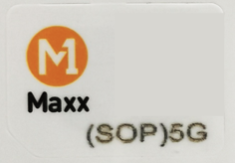
If “5G” is printed on your SIM card, you are holding a 5G SIM.
Example of 5G SIM. - How can I upgrade to 5G SIM?
If you have a 4G SIM, you can:- [Instant Activation] Upgrade to 5G eSIM: Open Maxx app, tap on “Account > SIM Management > Upgrade to 5G eSIM” or
- Upgrade to 5G physical SIM: Visit any Maxx Roadshows to exchange for a 5G physical SIM. Please bring your current Maxx SIM and the NRIC/FIN used during registration.
• NRIC/FIN physical card holder: Physical ID
• LTVP, Student Pass and Dependant Pass: Singpass Digital ID
Nothing is complete without a 5G plan from Maxx
All $12 and above Maxx plans are now 5G enabled.
If you do not have a 5G plan:
For recurring plans:
You can change your plan via the Maxx App:
- Open the Maxx App and go to Home.
- Tap View plan on your plan card.
- Scroll down and tap Change Plan.
- Choose a Maxx 5G plan
For one-time plans:
You can purchase a 5G plan via the Maxx App or at Maxx Retailers
Lastly, you need to have the right settings in your device
- Make sure your device is using the latest firmware with 5G settings switched on. We have compiled a guide here.

Frequently Asked Questions
Pretty much everywhere! M1’s 5G network covers over 99% of Singapore, so you can enjoy seamless connectivity island-wide.
It’s easy! All Maxx plans priced at $12 and above now come with 5G access. Just make sure you have:
- A 5G SIM card
- A 5G Standalone (SA) compatible device
- To check if your handset, SIM, and plan are 5G-ready, simply open the Maxx App and go to Account > Check Your 5G Readiness.
You can check in the Maxx App by going to Account > Check Your 5G Readiness.
Alternatively, take a look at the back of your current Maxx SIM card—if it’s labeled “5G”, then you’re already on a 5G SIM!